![onDark@half.png]](https://support.hypervolt.co.uk/hs-fs/hubfs/onDark@half.png?height=40&name=onDark@half.png)
Viewing Schedules
MMS gives you the flexibility to customise each charging session based on your preferred charging behaviour. For example, you can set a session to Super Eco during peak solar generation hours and on the same day schedule a separate session on Boost during off‑peak grid hours, maximising energy delivery while taking advantage of the available tariffs.
Selecting a Schedule
You can switch between Plug and Charge and Schedule Charge directly from the home screen. Selecting Schedule Charge will activate your preconfigured schedule.
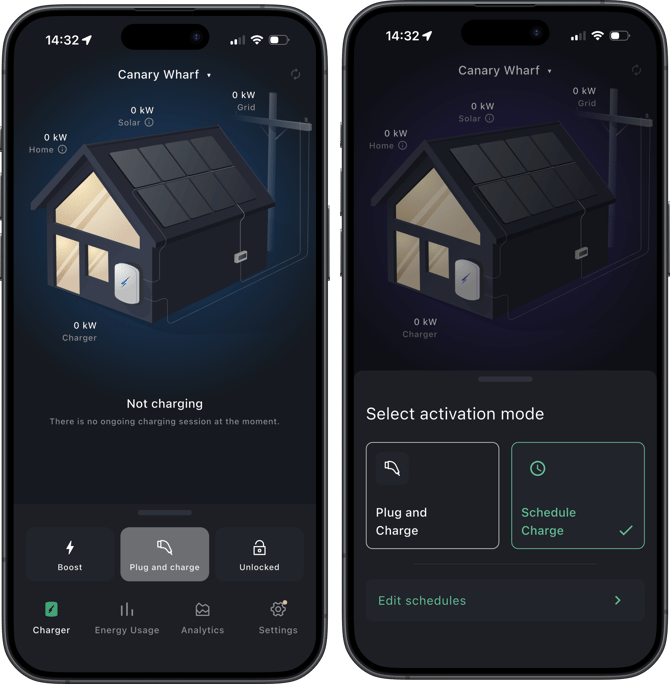
To access your schedule settings and select the Edit schedules option. You can also access your schedule settings by navigating to Settings → Charger settings → Schedule charge.
Configuring Schedules
To create a new charging schedule, select the 'Add session' button located at the bottom of the screen.
If you need to modify an existing charging period, select the 'Edit' button adjacent to the specific entry you wish to change.
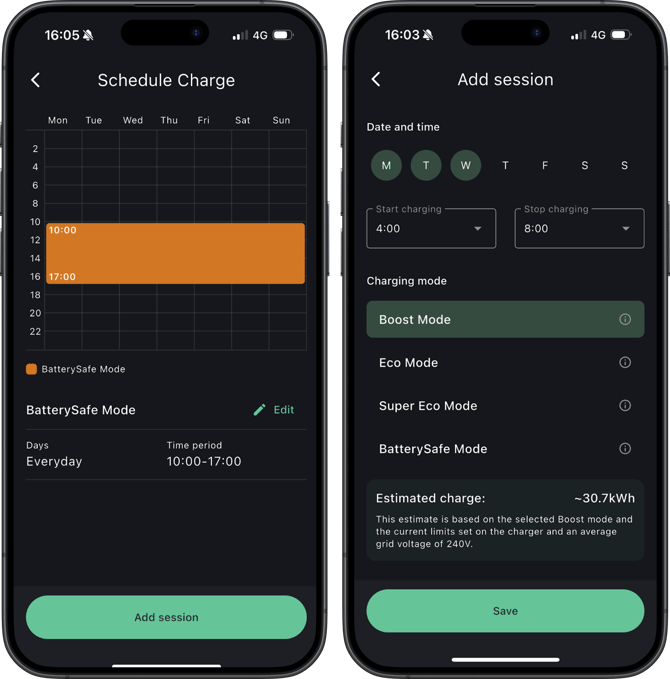
From here, you can configure sessions by day of the week, define start and stop times, and select your preferred charging mode.
The app will prompt you to resolve any overlapping sessions before you can save your changes.